
Synchronous vs Asynchronous JavaScript

What synchronous code means
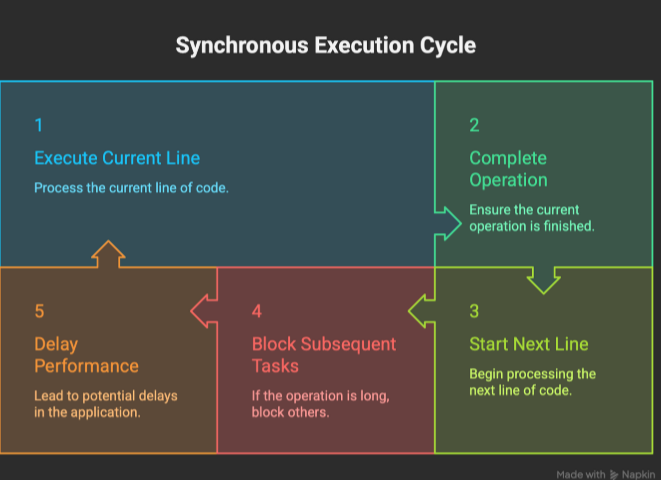
In JavaScript, synchronous code means the program executes line by line in a strict, sequential order. Each line of code must finish completely before the next one starts.
Key Characteristics
Sequential Execution: Tasks are performed one after the other.
Blocking: If a task takes a long time (like a massive calculation), it "blocks" the rest of the code from running until it is done.
Single-Threaded: JavaScript uses a single "call stack" to keep track of functions, meaning it can only do one thing at a time.
Predictable: Because code runs in the order it's written, the flow is easy to follow and debug.
Simple Example
javascript
console.log("First");
console.log("Second");
console.log("Third");
In this snippet, "Second" will never print before "First" because the execution is synchronous.
The Main Downside
While simple, synchronous code can be problematic for heavy tasks. For instance, if you request data from a slow database synchronously, your entire application (including the user interface) will "freeze" until that data arrives. This is why JavaScript developers use Asynchronous programming for things like API calls or timers.
What asynchronous code means
In JavaScript, asynchronous code refers to a programming approach where the execution of a task can start now and finish later, allowing the rest of the program to continue running in the meantime.
Because JavaScript is single-threaded, it can normally only do one thing at a time. Asynchronous code prevents the application from "freezing" or "blocking" while waiting for long-running tasks like fetching data from a server or reading a large file.
Key Characteristics
Non-blocking: The program initiates a task (like a network request) and immediately moves to the next line of code instead of waiting for a response.
Concurrent Operations: Multiple tasks can be in progress at once, improving the responsiveness of web applications.
Event-Driven: Once a long-running task finishes, the result is pushed back to the main thread (often via the Event Loop) to be handled.
Common Use Cases
Fetching data: Requesting information from an API using fetch().
Timers: Delaying execution with setTimeout() or setInterval().
File I/O: Reading or writing files in environments like Node.js.
User Interactions: Handling events like clicks or form submissions.
How it is Implemented
JavaScript has evolved to handle asynchronicity through several patterns:
Callbacks: Passing a function as an argument to be executed once a task is complete.
Promises: Objects representing the eventual completion (or failure) of an operation.
Async/Await: Modern syntax that allows you to write asynchronous code that looks and behaves like synchronous code, making it easier to read.
Why JavaScript needs asynchronous behavior
JavaScript needs asynchronous behavior primarily because it is single-threaded, meaning it can only execute one command at a time on its main thread. Without asynchronicity, any time-consuming task would "block" the entire program, causing it to freeze until that task is complete.
Asynchronous programming allows JavaScript to handle "start now, finish later" tasks—like fetching data from an API—without stopping the rest of the application.
Primary Reasons for Asynchronous Behavior
Preventing UI Blocking: In a browser, the main thread handles both JavaScript execution and user interface updates (like scrolling or button clicks). If a script runs a long task synchronously, the browser becomes unresponsive, leading to a poor user experience.
Efficient I/O Operations: Many common tasks are significantly slower than the CPU, such as:
Fetching data from a remote server via MDN: Fetch API.
Reading or writing files in Node.js.
Accessing databases.
Scalability for Servers: In environments like Node.js, asynchronous behavior allows a single thread to handle thousands of concurrent connections. Instead of waiting for one request to finish its data retrieval, the server can move on to the next request immediately.
Resource Management: It avoids the high cost of creating and managing multiple OS threads for every task. Instead, it uses the Event Loop to delegate these long-running tasks to the browser or system background and handle the results only when they are ready.
Key Mechanisms
To manage this behavior, developers use several patterns introduced over time:
Callbacks: Functions passed as arguments to be executed once a task finishes.
Promises: Objects that represent the eventual success or failure of an operation.
Async/Await: Modern syntax that makes asynchronous code look and behave more like synchronous code, improving readability.
Examples like API calls or timers
1. API Calls in JavaScript
API calls let your app fetch or send data to servers.
🔹 Example using fetch() (modern way)
// GET request
fetch('https://jsonplaceholder.typicode.com/posts/1')
  .then(response => response.json())
  .then(data => console.log(data))
  .catch(err => console.error(err));
👉 Output: JSON data from server
🔹 Example using async/await (cleaner)
async function getData() {
  try {
    const res = await fetch('https://jsonplaceholder.typicode.com/users');
    const data = await res.json();
    console.log(data);
  } catch (err) {
    console.error(err);
  }
}

getData();
🔹 POST request example
fetch('https://jsonplaceholder.typicode.com/posts', {
  method: 'POST',
  headers: {
    'Content-Type': 'application/json'
  },
  body: JSON.stringify({
    title: 'Hello',
    body: 'This is a post',
    userId: 1
  })
})
.then(res => res.json())
.then(data => console.log(data));
When API calls are used
Fetching user data
Login/signup systems
Weather apps
Payment gateways
2. Timers in JavaScript
Timers help you run code after a delay or repeatedly.
setTimeout() (runs once after delay)
setTimeout(() => {
  console.log("Runs after 2 seconds");
}, 2000);
👉 Executes only once
🔹 setInterval() (runs repeatedly)
setInterval(() => {
  console.log("Runs every 1 second");
}, 1000);
👉 Keeps running until stopped
🔹 Stop a timer
const id = setInterval(() => {
  console.log("Running...");
}, 1000);

setTimeout(() => {
  clearInterval(id);
  console.log("Stopped!");
}, 5000);
🔹 Real-world timer example (countdown)
let count = 5;

const timer = setInterval(() => {
  console.log(count);
  count--;

  if (count === 0) {
    console.log("Done!");
    clearInterval(timer);
  }
}, 1000);
🔄 How they connect to async behavior


API calls → handled by Web APIs / Node APIs
Timers → scheduled in event loop
Callbacks → executed later
👉 This is why JavaScript is non-blocking
Problems that occur with blocking code
Blocking code is anything that stops the main thread (event loop) from doing other work. Since JavaScript (especially Node.js) relies on a single-threaded event loop, this creates real issues.
What “blocking” means (quick idea)
// Blocking example
for (let i = 0; i < 1e9; i++) {}
console.log("Done");
👉 This loop freezes everything until it finishes.
1. Freezes the entire application


No other code runs
UI becomes unresponsive (in browser)
Server stops handling requests
👉 Users feel the app is “stuck”
2. Poor performance & slow response
Requests get delayed
APIs respond slowly
Throughput drops (fewer users handled)
👉 One heavy task = everyone waits
3. Breaks scalability
Node.js is designed to handle many users concurrently.
❌ Blocking code ruins this:
One request blocks others
Server can’t scale efficiently
4. Delays async operations
setTimeout(() => console.log("Timer"), 0);

// Blocking loop
for (let i = 0; i < 1e9; i++) {}

console.log("End");
👉 Output:
End
Timer
Even though delay is 0, timer runs after blocking finishes.
5. Bad user experience
Laggy UI
Buttons don’t respond
Pages take too long
👉 Users may leave your app
6. Can cause timeouts & crashes
API requests may timeout
Long CPU tasks may crash server
Memory usage can spike
Real-world blocking examples
Large loops / heavy calculations
Synchronous file operations (
fs.readFileSync)
Encryption/compression on main threadJSON parsing of huge data
How to avoid blocking
✔️ Use async methods:
fs.readFile('file.txt', callback);
✔️ Use:
Promises / async-await
Worker Threads (for CPU tasks)
Job queues (Bull, etc.)
✔️ Break large tasks into smaller chunks


