
Array Flatten in JavaScript

What nested arrays are
A nested array is an array inside another array.
👉 In simple words:
An array that contains other arrays as its elements.
Example
let arr = [1, 2, [3, 4], 5];
Here:
1, 2, 5→ normal elements[3, 4]→ nested array (array inside array)
🔹 Accessing Elements
To access values inside a nested array, we use multiple indexes.
let arr = [1, 2, [3, 4], 5];

console.log(arr[2]);      // [3, 4]
console.log(arr[2][0]);   // 3
console.log(arr[2][1]);   // 4
🔹 Example with 2D Array
let matrix = [
    [1, 2],
    [3, 4],
    [5, 6]
];

console.log(matrix[1][0]); // 3
👉 Think of it like a table (rows and columns).
Important Points
✔ An array can contain any type of data, including other arrays
✔ Used to represent tables, grids, matrices
✔ Access using multiple indexes
Simple Idea
[
  [1, 2],
  [3, 4]
]
Like:
1  2
3  4
Real-Life Example
Marks of students:
let marks = [
   [80, 75],   // Student 1
   [90, 85]    // Student 2
];
Why flattening arrays is useful
Flattening arrays in JavaScript is useful primarily because it simplifies data structure management and makes nested data easier to access, process, and manipulate. This normalization into a single-level array (a one-dimensional array) allows developers to apply standard array methods (like map(), filter(), or reduce()) consistently without needing complex, bespoke functions to handle multiple levels of nesting.
Key Benefits
Simplified Data Access and Manipulation: Accessing elements in a deeply nested array requires multiple bracket notations (e.g.,
arr[4][0][0][0]), which can be a "headache" to manage and prone to errors. Flattening transforms this into a simple single-level array, where any element can be accessed with a single index.Easier Iteration: Looping through a flat array is straightforward. Without flattening, developers might need complex nested loops or recursive functions to ensure all data points are processed.
Data Normalization: Data retrieved from different sources, such as multiple API endpoints, may come in varying nested formats. Flattening these disparate structures ensures the data is in a consistent, predictable format, leading to more consistent program behavior and fewer unexpected situations.
Streamlined Operations: It enables the seamless use of powerful built-in array methods like
reduce()for tasks such as summing all numbers or counting items, which are difficult to implement directly on deeply nested arrays.Efficient Data Processing: Flattening can sometimes offer performance benefits, especially when dealing with specific data types like Typed Arrays, due to more optimized index look-up times compared to managing multiple dimensions manually.
Real-World Use Cases
Aggregating API Responses: When combining data fetched from multiple API calls (e.g., blog posts from several authors), the responses often result in an array of arrays. Flattening merges these into a single list of posts for display or further processing.
Generating Lists (e.g., Autocomplete): In a search autocomplete function, generating suggestions from various sources might produce a nested array of terms. Using the
flatMap()method (which combinesmap()andflat()functionality) can process the data and create a single, flat list of suggestions efficiently.
Collecting Unique Tags: On a blog platform, collecting all unique tags from every post often involves mapping each post to its list of tags, resulting in an array of tag arrays. Flattening this structure allows for easy identification of all unique tags across the platform.
Concept of flattening arrays
Flattening an array means:
Converting a nested array (array inside array) into a single (flat) array.
Example
Before Flattening (Nested Array)
let arr = [1, 2, [3, 4], [5, 6]];
After Flattening
[1, 2, 3, 4, 5, 6]
👉 All elements are now in one single array.
🔹 Why Do We Flatten Arrays?
To make data easier to use
To perform operations like looping, searching, mapping
To simplify complex nested structures
🔹 Method 1: Using flat()
Syntax
array.flat(depth);
Example
let arr = [1, 2, [3, 4], [5, 6]];

let result = arr.flat();

console.log(result);
Output
[1, 2, 3, 4, 5, 6]
🔹 Flatten Deeply Nested Arrays
let arr = [1, [2, [3, [4]]]];

let result = arr.flat(Infinity);

console.log(result);
Output:
[1, 2, 3, 4]
🔹 Method 2: Using map() + flat()
let arr = [1, 2, 3];

let result = arr.map(x => [x, x * 2]).flat();

console.log(result);
Output:
[1, 2, 2, 4, 3, 6]
Important Points
✔ Flattening removes nesting
✔ flat() is the easiest method
✔ flat(Infinity) removes all levels of nesting
Simple Idea
[1, [2, [3, 4]]] → flatten → [1, 2, 3, 4]
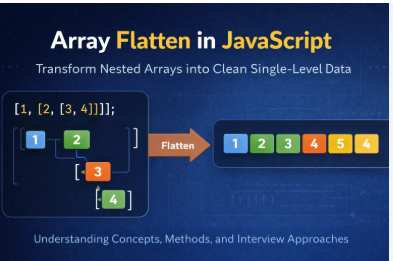
Different approaches to flatten arrays
Flattening arrays reduces nested structures into a single-dimensional array, with common JavaScript approaches including the built-in Array.prototype.flat(), recursion, reduce() with concat(), and the spread operator. flat(depth) is ideal for modern, shallow, or known-depth nesting, while recursive approaches handle deeply nested structures.
Here are the different approaches to flatten arrays:
- Array.prototype.flat() (ES2019): This is the cleanest, built-in method, allowing you to specify a
depthparameter to determine how many levels deep a nested array should be flattened.
const nested = [1, [2, [3]]];
const flat = nested.flat(2); // [1, 2, 3]
- Recursion: A function calls itself to process nested arrays, making it ideal for unknown, deep nesting, but it may cause stack overflow issues if too deep.
function flatten(arr) {
    return arr.reduce((acc, val) =>
        Array.isArray(val) ? acc.concat(flatten(val)) : acc.concat(val), []);
}
Reduce() and Concat(): A functional programming approach that iterates through the array, using
concat()to merge subarrays into an accumulator.Spread Operator (...) with concat(): A simple way to flatten one level of nesting.
let flattened = [].concat(...nestedArray);
flatMap(): Combines mapping and flattening into one operation, useful for mapping nested structures before flattening.
Iterative Approach (Stack): Uses a loop and a stack structure to avoid recursion depth limits, providing better performance on extremely deep arrays.
toString() or Generator Functions: Converts an array to a string and then splits it (for primitive values), or using generator functions to recursively yield values.
Key Considerations:
Performance: Recursive solutions can be slow or overflow the stack, whereas
flat()is generally highly optimized.Depth: If the depth is unknown or very deep, recursive functions or a
whileloop with a stack are preferred.
Common interview scenarios
ere are common interview scenarios where flattening arrays is used. These are very frequently asked and help you understand why it matters in real problems 👇
✅ 1️⃣ Flatten a Simple Nested Array
Problem
Convert:
[1, [2, 3], [4, 5]]
👉 Into:
[1, 2, 3, 4, 5]
Solution
let arr = [1, [2, 3], [4, 5]];

let result = arr.flat();

console.log(result);
✅ 2️⃣ Flatten Deeply Nested Array
Problem
[1, [2, [3, [4]]]]
Solution
let arr = [1, [2, [3, [4]]]];

let result = arr.flat(Infinity);

console.log(result);
✅ 3️⃣ Flatten Without Using flat() (🔥 Very Important)
Interviewers LOVE this.
Solution using recursion
function flattenArray(arr) {
    let result = [];

    for (let item of arr) {
        if (Array.isArray(item)) {
            result = result.concat(flattenArray(item));
        } else {
            result.push(item);
        }
    }

    return result;
}

console.log(flattenArray([1, [2, [3, 4]]]));
✅ 4️⃣ Using reduce() to Flatten
Problem
Flatten array using reduce
let arr = [1, [2, 3], [4, 5]];
Solution
let result = arr.reduce((acc, val) =>
    acc.concat(val), []
);

console.log(result);
✅ 5️⃣ Flatten + Transform (map + flat)
Problem
Double values and flatten
let arr = [1, 2, 3];
Solution
let result = arr.map(x => [x, x * 2]).flat();

console.log(result);
What Interviewers Check
They want to see if you:
Understand nested arrays
Know built-in methods (
flat)Can write logic (recursion / reduce)
Can handle real-world data structures


